Log in to your PagePixels account.
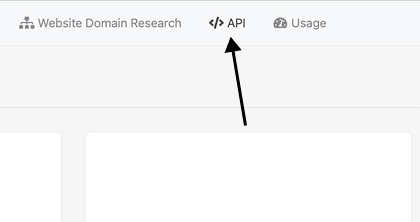
Click the API link in the navbar or go here.
Copy API Key
Go to the Private API Key section and copy your key.
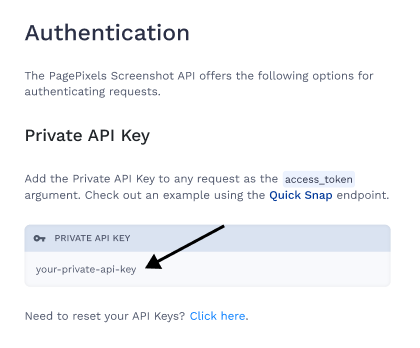
Note: cURL examples in the API Docs will also contain your API Key (value of access_token).
See how to copy your API key from the PagePixels Screenshot API docs and your User Profile page in this help article.
Log in to your PagePixels account.
Click the API link in the navbar or go here.
Copy API Key
Go to the Private API Key section and copy your key.
Note: cURL examples in the API Docs will also contain your API Key (value of access_token).
Log in to your PagePixels account.
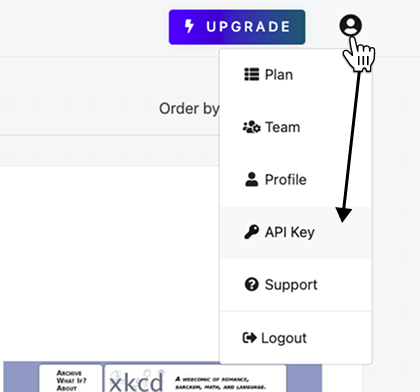
Select API Key from User menu
Click the avatar icon (top-right). Select the API Key option.
Get API Key
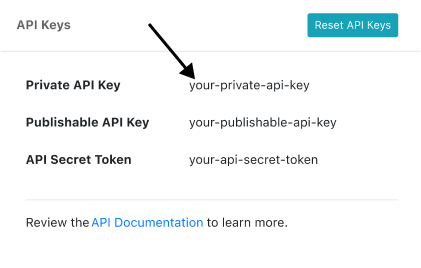
Copy the Private API Key value.
Questions? Contact us anytime by email:
support-tickets@pagepixels.com
Or send us a message through our Support page.
Every feature and integration is included on the free plan. No credit card and no phone number required.